🕔: 7 min – Technical: ✔
Generative vs. Analytical AI
Artificial intelligence is a fascinating and broad field, ranging from analytical AI, which detects hidden patterns in data, to generative AI, which independently creates entirely new content such as text or images. These two categories are the cornerstones of the modern AI world. While analytical AI quietly supports us in everyday life – for example, in voice assistants or personalized recommendations – generative AI is at the heart of creative innovation: it takes chaos, random patterns, and transforms them into something completely new.
In the following sections, we will take you on a clear journey: step by step, we show how generative AI works using image generation as an example. This single example helps us understand the basic principles, as the same mechanisms also underlie text or music generation. This way, you gain a deep insight into the mechanics with which these technologies redefine our creativity – while also raising new questions and challenges.
Examples of Generative AI
Artificial intelligence is used in many areas. Privately, we often use it for text, such as with ChatGPT, for images like DALL-E or Stable Diffusion, and also for music, for example, with Jukebox. Industrially, AI is used for code generation, such as with Claude, or for creating 3D objects, like with Hunuan 3D.
Despite this diversity, all these applications use the same basic elements: a precise prompt, a vector database to store relevant patterns, and an AI model that interprets these patterns and generates new content.
In the following sections, we will explore these building blocks in more detail to provide a fundamental understanding without diving into technical depths. We do this using the example of image generation with a diffusion model. Other models may differ, but this example gives us a solid foundation. It provides a clear basic understanding without getting lost in technical details.
Step 1: Preparation
First, we either create an AI model or use an already pre-trained base model that has learned from a large amount of general data – for example, typical objects and scenes. But like humans, these models have limits: they can only generate well what they have already seen. Specific or rare objects may sometimes fall through the cracks.
In our simple example, we rely on the standard model to keep it manageable. We could also conduct special training, in which the model gradually improves based on many examples, but for our purpose, it is sufficient to briefly mention this learning process to understand how we adapt models.
Step 2: Training and Learning
Imagine giving a child a blank sheet of paper and saying: “Draw a tree.” At first, the child scribbles wildly, but with each attempt and comparison, it learns to draw more accurately. Similarly, our model starts with random noise (called a seed), generates an image from it, and compares it with real examples. Over many iterations, often thousands, it adjusts its settings until it recognizes the fine patterns.
Most of the time, this is not a fully independent model, but an adaptation of an existing model, such as a LoRA (Low-Rank Adaptation). This adaptation changes specific parts of the model, allowing it to learn new styles, objects, or details without retraining the entire model. In the end, it produces an image that exactly matches the specifications we originally provided.
Step 3: The Key is the Prompt (Prompt Engineering)
In this step, you define via the prompt what the model should generate. The prompt is the content specification and describes motifs, properties, styles, perspectives, details, or desired moods as clearly as possible. The more precise and structured the description, the more targeted the model can work, and the more controllable the result becomes.
Different models interpret prompts differently. Some respond more to style terms, others to technical parameters or weightings of individual words. Therefore, prompt engineering also involves understanding how a particular model processes and prioritizes information.
In addition to writing a prompt yourself, it is also possible to have prompts generated or optimized by other AI models. This can help create more structured descriptions, find alternative formulations, or translate complex ideas into machine-readable instructions.
Good prompt engineering is often crucial for the quality of the result. Small adjustments in wording, order, or level of detail can produce large differences in the final image. With experience, one develops a sense of which information is necessary and how much to steer the model or deliberately leave space.
Step 4: Let the Magic Begin – What Happens Behind the Scenes
At this point, everything is essentially ready for you as a user – the prompt is set, and generation can start. While you wait for the result, a whole chain of processes runs in the background, turning your description into an image step by step.
First, the system must actually “understand” your prompt. Computers cannot process normal language directly, so your text input is first converted into numbers – called vectors. These contain the meaning of your words in a form the model can work with. In our workflow, this task is handled by the CLIP text encoder (or in some models, several encoders). Importantly, different models use different CLIP variants, as they have learned specifically with these during training.
Step 5: The Model – Seed and Vector Processing
Once the prompt is ready, the actual model starts generation. Everything begins with the seed, a random noise pattern that forms the starting point for the image. You can think of it like a blank canvas, initially consisting only of chaotic pixels – a messy jumble without recognizable structures.

At the same time, the model processes the information from your prompt, which was previously converted into vectors. These vectors contain the meaning of your text in a form the model can interpret and serve as a guide for building the image. During generation, a kind of “creative dialogue” develops between the seed and the vectors. The model interprets, combines, and refines the latent representation of the image step by step.
Importantly, at the end of this process, the image still exists in latent space – it is not yet output as a visible image. All shapes, structures, and details exist internally as an abstract mathematical representation. Only in the next step is this latent representation converted into a normal, visible image that we can view.
Through this iterative process, the model turns pure noise into a structured, coherent representation that exactly matches the information in your prompt.
Step 6: From Latent Space to the Final Image
After the model has fully built the image in latent space, the next step is to convert this internal representation into a visible image. Latent space is an abstract, mathematical form of the image – the model works efficiently here, storing patterns and structures, but we could not yet view it.
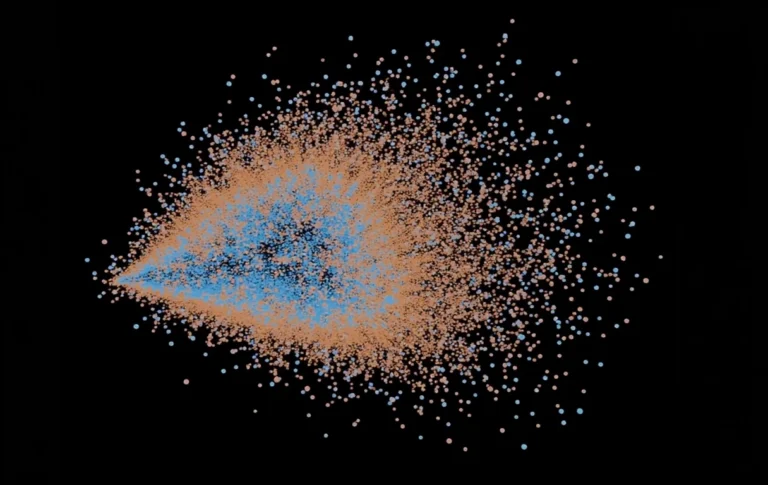
To generate a normal image from this, a Variational Autoencoder (VAE) is used. It decodes the latent representation into pixel values. You can think of it as translating an abstract sketch into a real image: colors, shapes, and details become visible while maintaining the internal structure of the model.
The model has already formed all details step by step: contours, patterns, textures, and composition now match the prompt. The VAE translates this information into a final image that we can see and use.
At the end of this process, you hold the finished image in your hands – the result of an iterative, coordinated interplay of seed, vectors, diffusion process, and latent representation. From an abstract cloud of numbers, a visible, coherent image emerges that exactly matches the prompt specifications.








Fun Fact: Creativity
If you use the same prompt, the same model, and the same seed, an AI image generator will always produce exactly the same image. AI “creativity” comes almost entirely from the initial random noise – and unlike humans, this creative output is fully reproducible. In other words, an AI can repeat the same idea exactly every time, while human creativity is naturally variable and unpredictable.
Fun Fact: Even Models Can Get a Headache While Training
An AI model can be trained so well that it memorizes the training data perfectly – and in doing so, completely forgets how to handle new, unseen data. This phenomenon is called overfitting. Unlike humans, who often generalize when learning, AI remembers every detail down to the last pixel. This can lead to results that are exaggerated, strange, or downright comical – a bit like the AI being “too smart for the exercise.”
And This is How Generative AI Works – Almost Always the Same Way
Whether generating images, text, or music, most generative AI models operate on similar basic principles: they convert large amounts of training data into vectors in latent space, recognize patterns, and learn how these patterns can be combined meaningfully. The model starts with some randomness (the seed), “experiments,” and adjusts its internal settings until it produces a result that matches the specifications.
Although architectures or data types may differ, the core idea remains the same: learning from examples, navigating latent space, and finally generating something new based on the learned patterns.
We hope that this example has helped make the world of artificial intelligence a bit more understandable, and, as always, we look forward to your feedback.